View step-by-step instructions for Real Estate Contract Services processes by clicking on plus sign to expand the section and view.
New Store Process Aids
This process pertains to submission of an Amendment, Waiver, & Other Document Types for new stores that have not yet opened.
Refer to RElay Next SDRC page for QRGs and links to training.
This process pertains to lease execution for new stores, relocations, and expansions.
SLA is 3 business days from receipt of all required materials.
Regional Team: The Regional Team, in conjunction with Legal, determine lease is ready for execution.
RECS Team: RECS becomes engaged in the process per the RElay Next process
1. Required Materials via RElay Next (Legal):
Lease execution package
Lease Review Memo ("LRM")
2. Required Materials via RElay Next (Regional Team):
Final Lease Pro Forma: Even if the metrics have not changed from DAC, RECS still requires the submission of a "Commit-Docs Pro Forma". (Only Pro forma Version 8.0 or newer will be accepted for any Lease submitted for execution, with Flex P&L no older than 6 months.)
Store Cost: If store cost (pre-TIA) has increased by more than 15% or $200K since most recent DAC approval, then lease cannot be executed, and deal must be reapproved by DAC.
- Capital Exception: If deal bcomes a Capital Exception, then lease cannot be executed, and deal must be reapproved by DAC.
3. Required Approvals via RElay Next:
Refer to the RECS Approval Matrix
4. Conditions vs Action Items:
- Always check the Relay Next deal to determine if any conditions or action items were set by DAC. If so, see the following requirements for each:
Conditional Approval: Written confirmation is required showing that the Conditional Approval was followed-up on to the satisfaction of DAC.
Action Item: Documentation required that demonstrates the Action Item was completed.
How will I know the partially executed lease has been sent to the Landlord?
- The SDM and REP will receive an email letting them know it has been sent, including any applicable tracking number(s).
- RElay Next deal will be in the Execute stage and Pending Full Execution step. The following RElay Next data fields will be populated: Partial Execution Date, Date Shipped, Shipping Method, and Tracking Number (if applicable).
How will I know when the lease has been fully executed?
- The SDM and Real Estate Representative will receive an email notification when the lease is fully executed.
- Fully Executed Lease and all fully executed ancillary documents (ex. MOL, SNDA, Waivers, etc.) sent to Landlord for counter-execution received. RElay Next deal will update to Completed - Resolved and will no longer be visible in widgets. The following RElay Next data fields will be populated: "Full Execution Date" and "All documents received and deal completed".
- Fully Executed Lease received, but ancillary documents (ex. MOL, SNDA, Waivers, etc.) sent to Landlord for counter-execution have not been received. RElay Next deal will be in the Execute stage and Fully Executed step. The following RElay Next data field will be populated: Full Execution Date.
What if the fully executed lease comes back with slip pages or handwritten changes?
RECS will engage the Regional Team and Legal to determine whether or not the changes are acceptable, and if not, next steps.
This process pertains to submission of New Store deals
1. Refer to RElay Next SDRC page for QRGs and links to training.
2. Materials Required to Prepare Deal for DAC submission:
- Site Submittal Package (SSP): Complete the following tabs
- SSP
- Executive Summary: Provide applicable commentary in each text box
- Broadband Map (visual)
- Trade Area (visual): Note the location of cannibalized stores and percentage of cannibalization.
- Closeup Aerial (visual)
- Site Plan (visual)
- Interior Test Fits: Only for non-prototypical EB/DTEB and Bridge sites.
- LOI-LRM
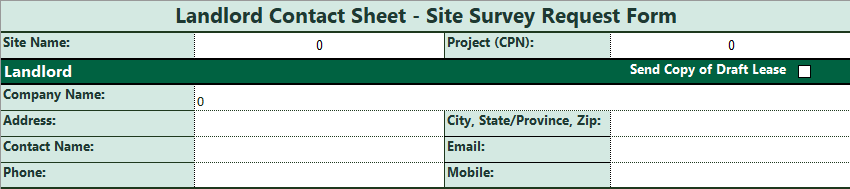
- Landlord Contact SSR
- Global Investment Pro Forma (GIP)
- *Flex P&L: Extract no older than 6 months from RElay Next SD Director Deal Package Approval date (within RElay Next Final Review and Approval stage)
- Letter of Intent (LOI): Include Landlord Workletter and any Exhibits or Attachments referenced in the LOI
3. Approvals/Review Required:
- Market Planning: Market Planning Site Assessment (MPSA) must be attached to the RElay deal by the Market Planner prior to the Regional Team routing the deal forward for SDD approval in RElay.
- Ristretto:
- EB/EB DT: (1) Non-prototypical Espresso Bar sites must be reflected on the Ristretto Site Intake Smartsheet, with an Interior Test Fit submitted via RElay. (2) Atlas Seconday Concept to be noted as Espresso Bar.
- DT 1900 (Bridge): (1) Non-prototypical Bridge sites must be reflected on the Ristretto Site Intake Smartsheet, with an Interior Test Fit submitted via RElay. (2) Atlas Seconday Concept to be noted as Bridge.
- EB/EB DT: (1) Non-prototypical Espresso Bar sites must be reflected on the Ristretto Site Intake Smartsheet, with an Interior Test Fit submitted via RElay. (2) Atlas Seconday Concept to be noted as Espresso Bar.
- SDD: store development director, Coffeehouse Development (via RElay)
- Finance: store development Finance (via RElay)
4. Atlas: Promote New Store to SSP Submitted
5. If the deal is related to a Relocation, see Relocation Submissions Process Aid under Existing Store Process Aids.
6. If deal is related to an Expansion, see the Expansion Submissions Process Aid under Existing Store Process Aids.
Instructions
- This Site Submittal Package is to be completed in its entirety by the Deal Manager.
- As you complete the Executive Summary, please provide detailed information, due diligence, documentation & visuals that support your decision logic for approval of this location for development as a new coffeehouse or relocation of an existing coffeehouse.
Additional Attachments Required
Please be sure all versions are the most recent versions from SDRC
- Proforma
- LOI (Fully Executed)
- LLWL (If referenced in LOI or applicable)
Glossary of Terms
The list below will assist with defining the drop-down boxes.
LOI Version
- LL Work Letter:
- Full – complete letter delivered with minor exceptions, for example, no hose bibs
- Slightly Modified – Deletions that will require SBUX to add to the budget, for example, deleting underground utility distribution
- Significantly Modified – Large deletions such as HVAC, Storefront etc. Gray/Cold dark shell should fall under significant modification
- None – No work letter at all
- Quality of Area:
- Poor – Activity low peak, non-peak (business occurs in the mid-morning and evening)
- Fair – Activity medium peak and low non-peak (business occurs in the morning, mid-morning and afternoon)
- Good – Activity medium peak and non-peak (business occurs morning, mid-morning and afternoon, regularly)
- Excellent – Activity occurs in high peak and medium non-peak (business occurs in early am and steady through the day)
- Premier – Activity occurs high peak and non-peak (business occurs early morning, mid-morning and strong afternoon and evening)
- Strategic Position:
- Significant Competitor Advantage – Does a competitor have better access, visibility, parking, and circulation?
- Starbucks Competitor Balance – Equal in access, visibility, parking, and circulation
- Starbucks Advantage – Does SBUX have better access, visibility, parking, and circulation?
- Significant Starbucks Advantage – Does SBUX leave our competitor in the dust!
- Site Visibility:
- Fully Obstructed – No visibility from the street
- Partially Obstructed – is there a limited view (trees, pylon sings etc.)
- Short Distances from One Or more Directions: Can you see the site only as you approach from any direction?
- Great distances From One Direction – Is the visibility significantly better from one direction vs. two?
- Great Distances from two or more directions – Can you see this site from any approach regardless of direction?
- Vehicle Access:
- NA – site doesn’t rely on vehicular
- Very Difficult – Limited or circuitous access
- More Difficult – Many turns involved to get to the site
- Average – Non-signalized entrance, wait times limited, for access
- Easy – Signalized vehicular movement, right in/right out
- Very easy – multiple points of ingress and egress including traffic signals
- Pedestrian Access:
- NA – Site does not rely on pedestrian access
- Significant Obstructions – limited by un-moveable structures or access
- Some Obstructions – Impediments to access like stanchions
- Easy Access/No obstruction
- Dedicated Parking:
- NA – Site does not rely on vehicle traffic
- Zero spaces – no dedicated Starbucks parking
- One to four spaces – total dedicated parking spaces available
- Five to Ten – total dedicated parking spaces available
- Ten plus dedicated parking spaces available
- Parking Availability:
- NA – Site does not rely on vehicle traffic
- Spaces rarely available peak and non-peak
- Less than 40% during peak and non-peak
- 40-60% available peak/open availability non-peak
- 60-80% available peak/open availability non-peak
- Open availability peak and non-peak
Fill in the Following:
- Primary Artery
- Traffic count 1
- Traffic location 1
- Secondary Artery (if any)
- Traffic count 2
- Traffic location 2
- Of Prominent Driving Radius or Drive Time, Add:
- Day population
- College edu
- Median income
- Trade Area/Polygon Information
- Trade area population
- Drive Time (DTHRU only) – Yes or No?
- If DT, List Number of Cars in the Drive Thru Stack
- Signage Installation Rights
- Follow LOI ratings as to signing assessment. Do we have full unfettered signing rights from LL and applicable laws? Including but not limited to use of our font, logo, and colors on three or more store fronts and monument signing areas.
- Less than above, will need to be called out as a fallback position.
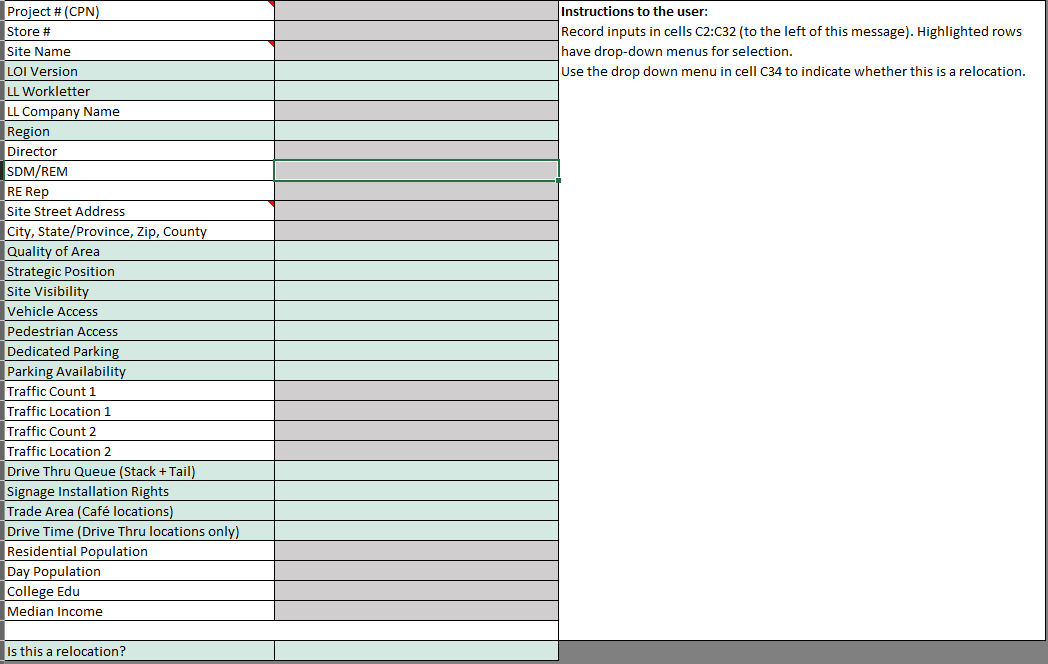
Tab 1 - Site Information
- Select from dropdown menu or fill in information (ie project name)
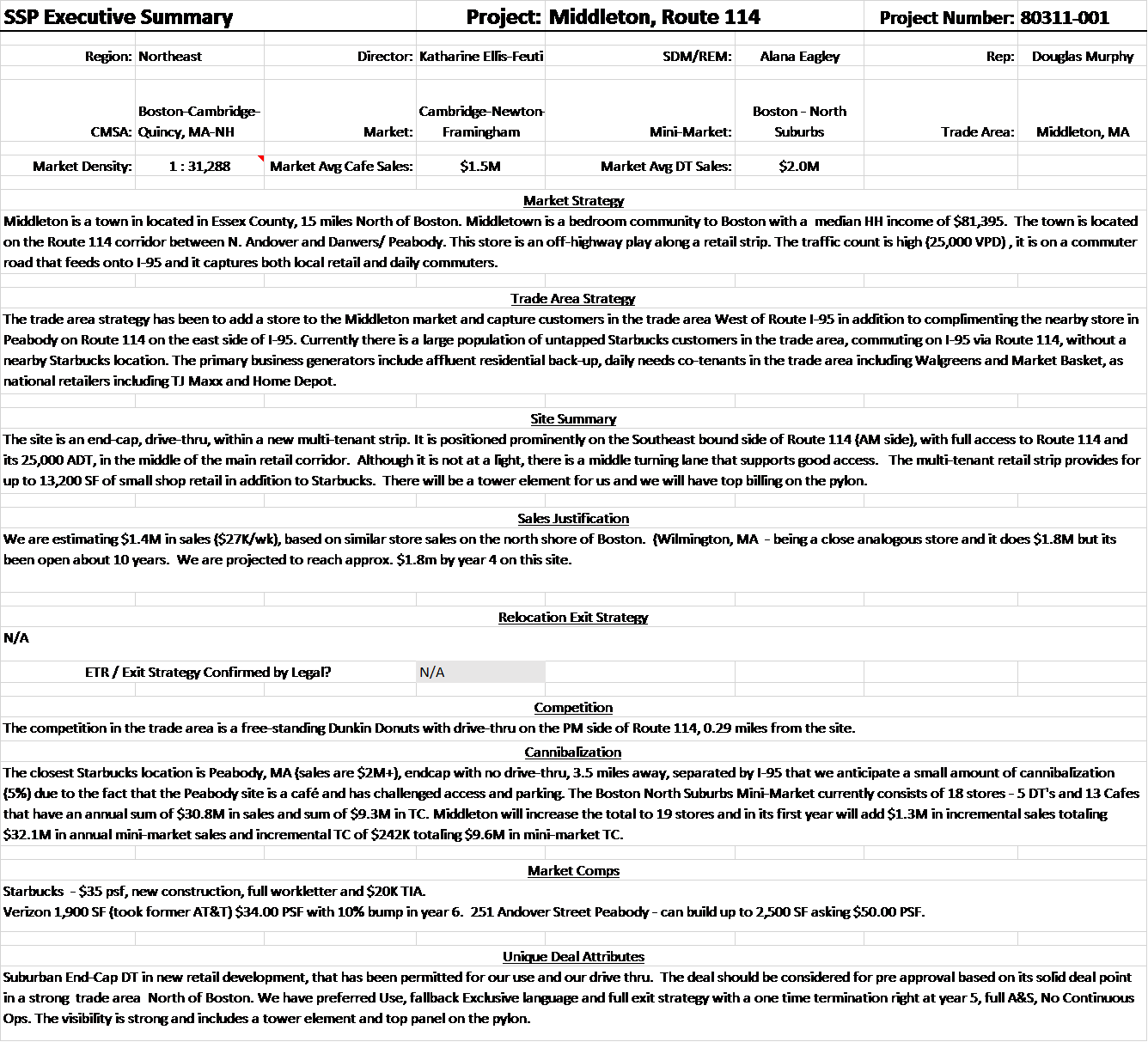
Tab 2 - Executive Deal Summary (EDS)
The EDS is a narrative that describes and supports the site proposal. Outlined below is a description of each section of the EDS & its intent. In addition, there are examples of the expected narratives for reference to help guide you if needed.
- Project Info: Fill in project team, demographic information & average sales etc. per the section titles.
- Market Overview: Should be a description of the market business generators that describe the economic base including but not limited to major arteries, residential, retail and any relevant unique aspects of the market that are notable generators.
- Trade Area Strategy: Describes the “why this market” background. Provide the details of your strategy/plan, generators and notable trade area attributes.
- Site Summary: Outlines the specifics of the site, including site attributes, including but not limited to visibility, access, site circulation, parking, type of project, (BTS/Ground Lease etc), location of additional stores within the trade area.
- Sales Justification: If Year 1 Sales projections differ from the OSR, explain the variance.
- Relocation Exit Strategy: If relocating a store, explanations are needed to describe the current store lease information and overall exit strategy including all dead rent obligations and notification time lines. IMPORTANT NOTE: Legal must review the exit strategy to confirm findings and assess risk.
- Competition: Please list all competitors within the trade area & provide details as to their relevance to market, trade area and/or site.
- Cannibalization: Please explain the decision logic behind cannibalization as well as overall impact to the market.
- Market Comps: Please provide comps.
- Unique Deal Attributes: Please call out any outliers to our LOI or the overall deal, site, financial or legal risk. This is your summary recommendation and risk assessment of the overall deal. Examples of outliers could be; conforming lease language, any closed SBUX stores that were in the market, any additional incremental cafes or dt that we are adding in the market that could affect the site being presented.
Ex.: Executive Summary
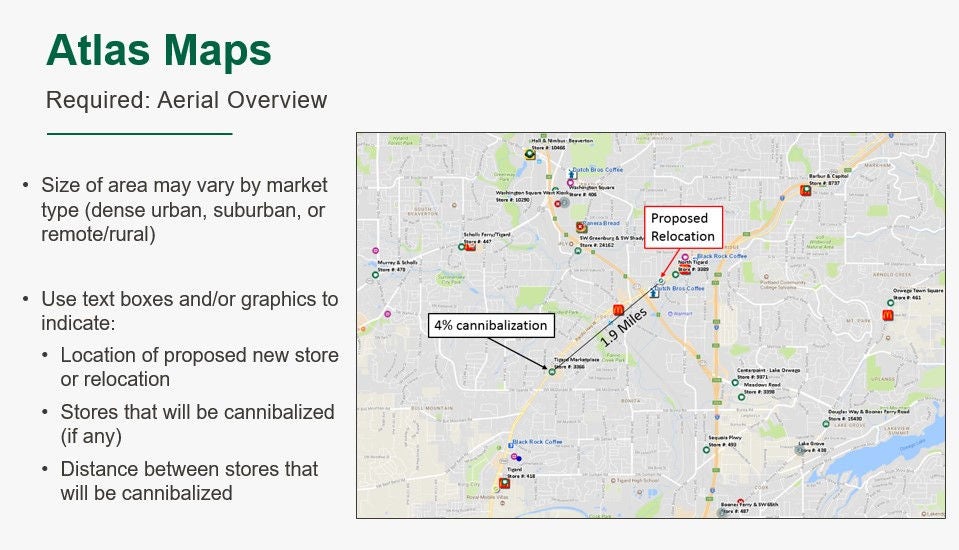
Tab 3 - Trade Area Map
- Must use an Atlas map in aerial format
- Turn on advanced store labels and competition layers
- If cannibalization is expected, identify the new store, store to be cannibalized and distances on the map
- If it is a relocation, identify existing store, proposed new location and distances on map
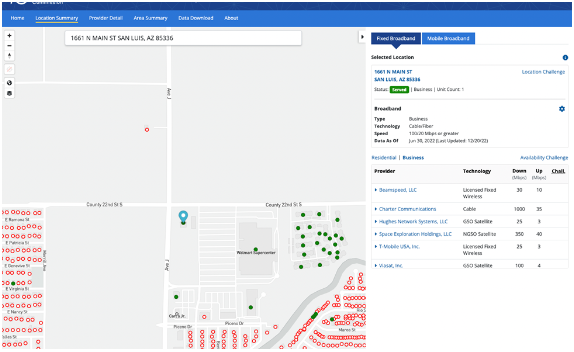
Tab 4 - Broadband Map
- Use approved map and requirements per RNP instructions
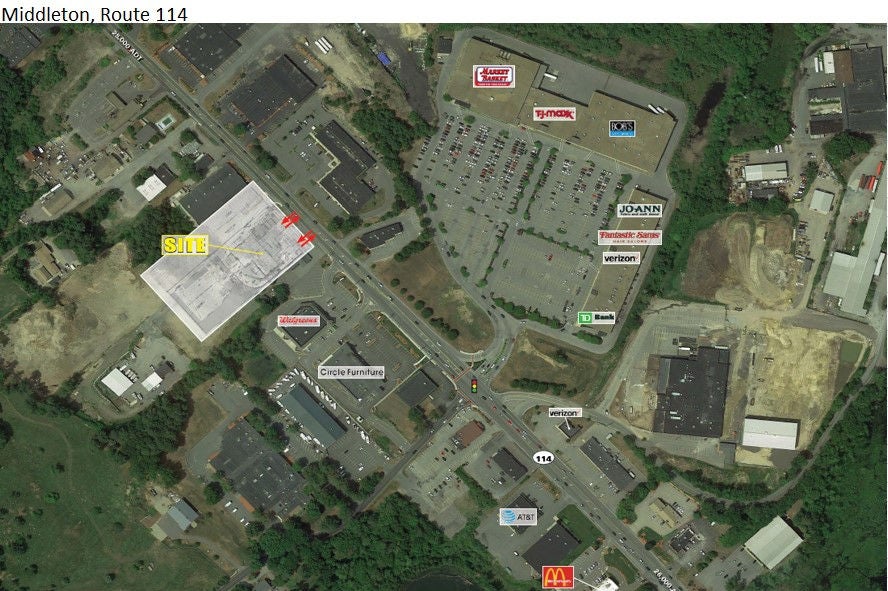
Tab 5 - Close-Up Aerial
- Please indicate circulation
- If available, place Starbucks footprint on site plan see examples below
Tab 6 - Site Plan
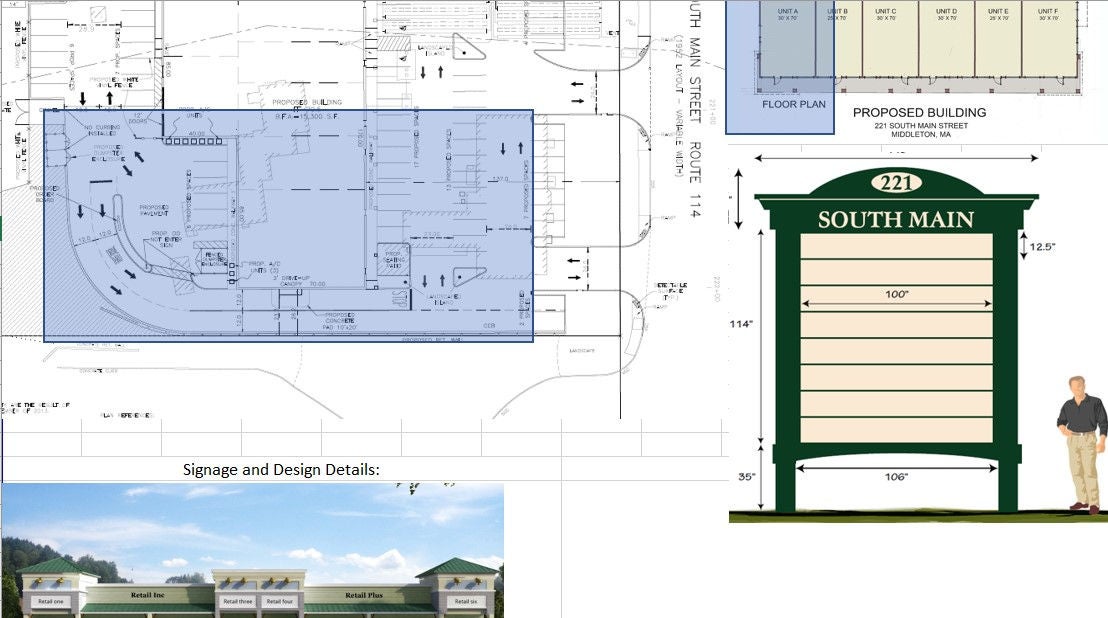
- Please submit site plan for approval
- If schematic is completed please submit schematic (optional visual)
- Include any signage detail and design status that is available
Tab 7 - Optional Visual
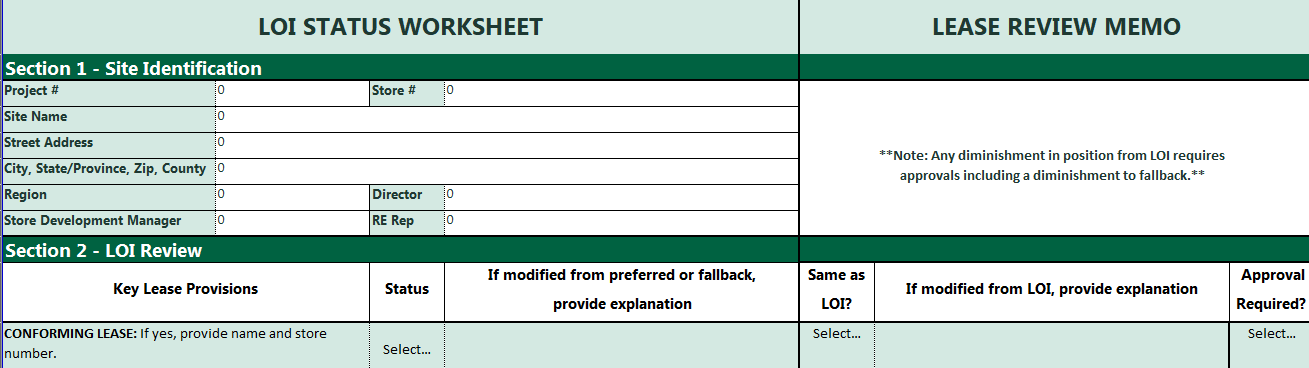
Tab 8 - LOI-LRM
Tab 9 - Landlord Contact SSR
Existing Store Process Aids
1. Characteristics of an Expansion (one or both scenarios below can apply):
Increase in Square Footage
Change in Business Model: Modifications that affect either the store engine or operating model (ex: adding a Drive Thru window, thereby changing a Café to a Drive Thru).
2. Refer to RElay Next SDRC page for QRGs and links to training.
3. Required Deal Attachments:
- SSP
- Pro Forma: Complete Pro forma New Site tab and Existing Site tab
- *Flex P&L: Extract no older than 6 months from RElay Next SD Director Deal Package Approval date (within RElay Next Final Review and Approval stage)
- One Store Report
- R2PF (Deal Summary tab)
- LOI if available
- Approval/Review Required:
- Ristretto:
- EB/EB DT: (1) Non-prototypical Espresso Bar sites must be reflected on the Ristretto Site Intake Smartsheet, with an Interior Test Fit submitted via RElay. (2) Atlas Seconday Concept to be noted as Espresso Bar.
- DT 1900 (Bridge): (1) Non-prototypical Bridge sites must be reflected on the Ristretto Site Intake Smartsheet, with an Interior Test Fit submitted via RElay. (2) Atlas Seconday Concept to be noted as Bridge.
- EB/EB DT: (1) Non-prototypical Espresso Bar sites must be reflected on the Ristretto Site Intake Smartsheet, with an Interior Test Fit submitted via RElay. (2) Atlas Seconday Concept to be noted as Espresso Bar.
- SDD: store development director, Coffeehouse Development (via RElay)
- Finance: store development Finance (via RElay)
- Ristretto:
1. Annually, typically in October, the SSC AM team will send to all SDM's and reps a spreadsheet of upcoming lease renewals, per Relay, for the next 3 years out. This spreadsheet will be sent just prior to the Field Portfolio Review meetings.
2. Regional teams then determine which upcoming lease renewals to assign to the SSC Renewal Team/Consultants to negotiate on their behalf and note them on the spreadsheet sent by the SSC. (The spreadsheets are typically due back to the SSC team within 20-30 days)
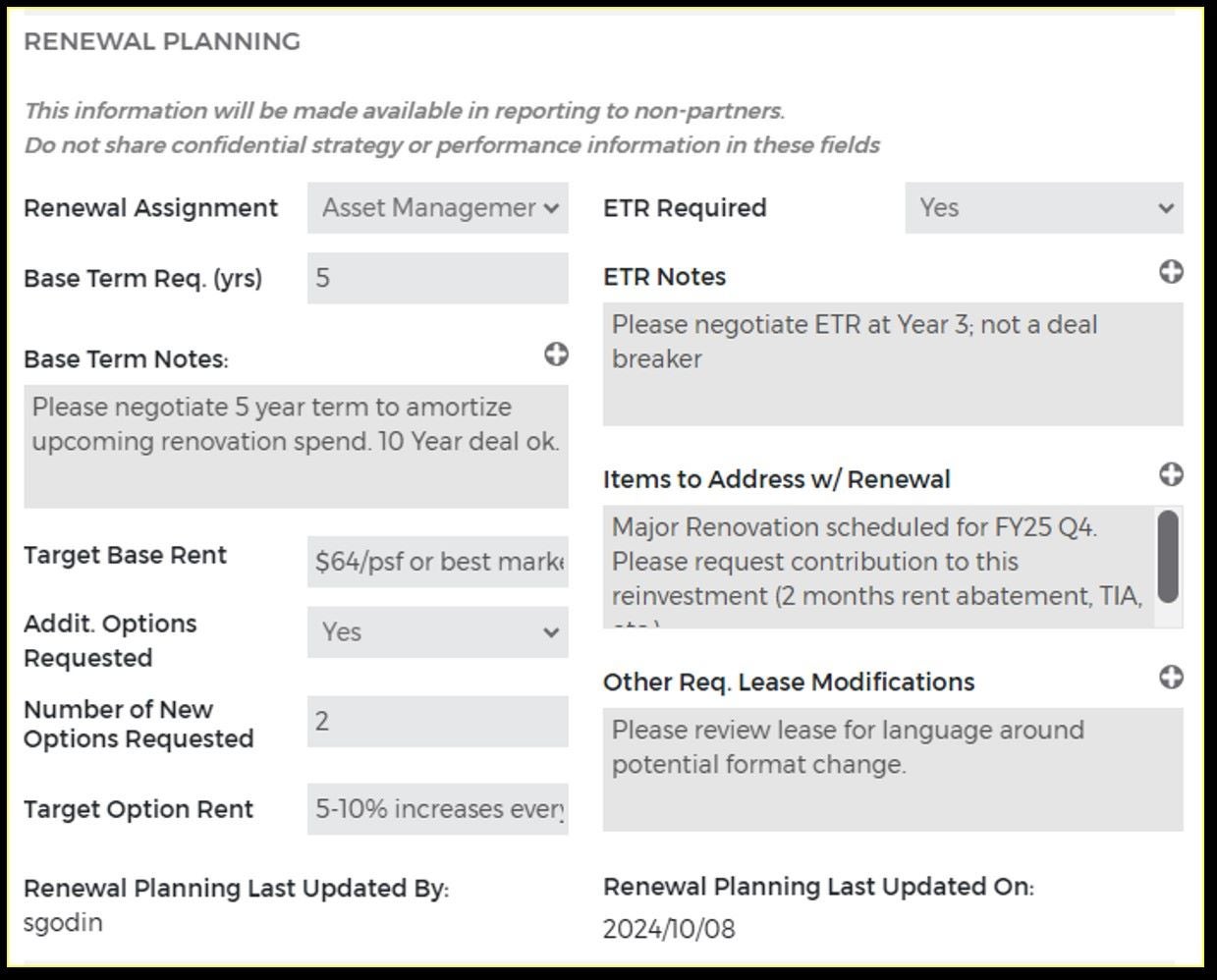
3. The REM Existing Store will assign the renewal to the SSC Renewal Team using Atlas, Renewal Planning Tab. As a minimum, the REM-Existing Store will include the following Deal Points:
- Base Term Req. (yrs) in numeric format
- Base Term Notes: Enter any base term information for Asset Management and the Consultant, such as 5 years needed but a longer term is okay
- Target Base Rent: Enter the target based rent, i.e. $64/sf or lower than market
- Additional Deal Points (Optional): Optional Deal Points can be entered in Atlas Renewal Planning Tab, as needed
4. When a Renewal is assigned to the SSC Renewal Team/Asset Management, the deal will be added to the Asset Management Transaction Management Smartsheet.
5. Asset Management will review the Deal and when assign the Renewal to a Consultant.
6. After renewal terms are documented in a Renewal Letter of Intent (LOI) and the deal is ready for Review by Asset Management, the Consultant will Initiate the Deal in RElay Next.
Refer to the RElay Next Quick Reference Guides - Renewals - Asset Management for additional steps on how Renewals assigned to Asset Management are processed, from Initiate and Submission to a Fully Executed Amendment. The QRGs can be found on the SDRC here
1. Refer to RElay Next SDRC page for QRGs and links to training.
2. Materials Required:
- Site Submittal Package (SSP) – Complete the following tabs
- SSP
- Executive Summary - Provide applicable commentary in each text box
- Broadband Map
- Trade Area (visual) – Note location of cannibalized stores and percentage of cannibalization
- Close-up Aerial (visual)
- Site Plan (visual)
- Interior Test Fits: Only for non-prototypical EB/DTEB and Bridge sites.
- LOI Status
- Landlord Contact SSR
- Global Investment Pro Forma (GIP)
- *Flex P&L: Extract no older than 6 months from RElay Next SD Director Deal Package Approval date (within RElay Next Final Review and Approval stage)
- Letter of Intent (LOI) – (LOI must be fully executed) Include Landlord Workletter and any Exhibits or Attachments referenced in the LOI
- R2PF (Deal Summary tab)
- One Store Report
- Email from Legal confirming they have reviewed the proposed Existing Store Exit Strategy and it is permitted under the terms of the Lease. Confirmation is required for all Exit Strategy types with the exception of terminating upon natural lease expiration.
3. Atlas – Promote New Store to SSP Submitted
4. Approval/Review Required:
- Ristretto:
- EB/EB DT: (1) Non-prototypical Espresso Bar sites must be reflected on the Ristretto Site Intake Smartsheet, with an Interior Test Fit submitted via RElay. (2) Atlas Seconday Concept to be noted as Espresso Bar.
- DT 1900 (Bridge): (1) Non-prototypical Bridge sites must be reflected on the Ristretto Site Intake Smartsheet, with an Interior Test Fit submitted via RElay. (2) Atlas Seconday Concept to be noted as Bridge.
- SDD: store development director, Coffeehouse Development (via RElay)
- Finance: store development Finance (via RElay)
This process pertains to stores that have been previously approved by DAC to relocate or by the Challenged Store Steer Co. to close.
SCNF Steps
1. The SCNF Smartsheet record will be automatically initiated upon:
- Permanent Closures (stand-alone): Creation of RElay Next Closure deal by RECS upon CSSC approval and RECS entering a committee approval date.
- Relocations: RECS team entering a committee approval date in the RElay Next Closure deal upon DAC approval.
- Note(s):
- An email alert automation will notify responsible SDM, REM, and REP each time a record is initiated.
- CBRE will have visibility to the store at this point.
- RElay Next step: Holding for LDO
2. 40 days PRIOR to the Last Day of Operations:
- Responsible SDM/REM/REP confirm dates and information in the Existing SCNF Submissions Dynamic View and populate the following fields:
- SCNF Review Date - REQUIRED
- Estimated Turnover to LL Date (should generally be within one week of Contractual Lease Expiration Date) - OPTIONAL
- Information and Dates are pulled from Atlas (LDO), Compass (First Day of Operations – RELOs), Lucernex (Lease Expiration Date), and RElay Next (RE Partner Contacts). Update Atlas and Compass as frequently as needed to maintain systems and SCNF accuracy – Do not modify dates in the SCNF Smartsheet.
- Note(s): In RElay Next, the closure record will automatically move to the Finalize SCNF step 40 days prior to the LDO (See RElay Next QRG Closure – Closeout – All Closeout Steps for reference).
3. Confirmation of Ops Partner Notification: Confirm with Ops that store partners have been notified of the closure and attach the confirmation to the RElay Next deal.
- Permanent Closures: REQUIRED. RECS cannot publish SCNF without this confirmation.
- Relocations: May be Required. RECS may require confirmation if there's a significant period between when the existing location closes and the new location opens.
- NOTE: Other than attaching the confirmation to the RElay Next deal, Do Not make any other updates such as checking the "Ops partner notification verified and uploaded" box or moving deal forward to Pending Store Closure. RECS will make updates to the deal accordingly after administrative work is completed.
4. RECS will publish the SCNF 30 days prior to the LDO.
- If dates change after an SCNF has been published, update Atlas and/or Compass so that a Revised SCNF can be published, and RElay Next can run as intended.
- If Estimated Turnover to LL Date changes, update the Existing SCNF Submissions Dynamic View and email the RECS Inbox that a change was made.
Store Closure Inquiries & Reporting Review Steps
1. Review The Store Closure Inquiries Report Weekly
- The report is refreshed Fridays, with RECS sending an e-mail reminder. Please note that if the report is reviewed on days other than Friday, it's up-to-date as of the previous Friday.
- Review The Following Closure Dashboard Tabs: Questions/Comments to keep track of your stores and Closures with an ETR to monitor approved closures with ETR.
- Report can be filtered by Region, SDM, REM, or by individual store number.
2. If a Store is Ceasing Operations But is Not on the Store Closure Inquiries Report:
- Confirm if it's listed in the Existing SCNF Submissions Dynamic View. If not, submit the the details via email to the RECS Inbox.
- The report uses data from Compass (First Day of Operations – RELOs), Lucernex (Lease expiration and ETR data), and Atlas (LDO). If dates in these systems are incorrect, then the Store Closure Inquiries Report could omit a store that is closing soon.
`
Store Closure Inquiries & Reporting Review Steps
- Update Records: Always update Atlas and/or Compass if dates change.
- Bookmark the Report: Eliminate the need to search for link in e-mails (Link to Report: Store Closure Inquiries ).
- Partner Emails: Ensure auto-populated emails from CART are up-to-date.
- Turnover of Premises: Estimated Turnover Date to Landlord should generally be within one week of Contractual Lease Expiration Date.
Once the field determines a store closure:
1. Field sends a request to Asset Management to either terminate the lease or sublease it.
2. Asset Management engages termination option with the landlord.
If the LL is unwilling to terminate the lease, Asset Management retains a broker to market the space.
3. Once a potential subtenant is secured, the broker submits subtenant LOI/BOV/credit worthiness to Asset Management Team.
4. Upon completion of evaluation, including credit worthiness of the subtenant, Asset Management generates subtenant site submittal package and submits it for leadership approvals.
5. Once leadership approves the deal, package is uploaded on RECS Tracking Log.
6. RECS team will guide the subtenant lease execution process including the request for W9 information from the subtenant.
7. Regardless of whether the dark is subleased or not, the Facilities team is responsible for repairs and maintenance of the asset for the duration of the Starbucks obligation.
- (Asset Management should complete the process of subleasing the space within 30 days of receiving the LOI/BOV).
Financial Analysis - Store Closure Accrual on SharePoint
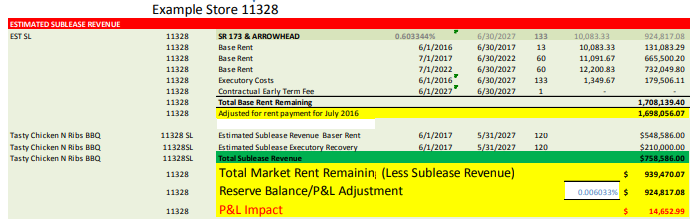
Asset Manager reevaluates the deal for P&L impact

Approval Summary Dashboard for subtenant business case
The following should be noted with the approvals:
- Asset Manager and Business Analyst are responsible for evaluating all options of releasing Starbucks from Lease obligation or lessening its financial
- Subleasing the space:
- Ensuring financial analysis of the subtenant
- Writing SSP summary
- Routing SSP or approval
- Uploading the deal on RECS Tracking Log
Termination Agreement has been reached with the Landlord.
1. Refer to RElay Next SDRC page for QRGs and links to training.
2. Attach terms of the Termination Agreement and provide as much detail as possible:
Example: Provide exact amount we have agreed to pay LL to terminate early, instead of stating "LL providing a 50% reduction in rent."
This process pertains to the payment of Termination Fees due in connection with an Early Termination Right provision in an existing Lease or Lease Amendment.
1. RECS Deal Advisor will initiate contact with the Deal Maker approximately 1 month prior to the due date of the Termination Fee (due date defined per Lease or Lease Amendment language). Generally, Termination Fee due dates fall in to three categories:
Termination Fee due with ETR Notice: The Termination Fee will accompany the ETR Notice.
- Termination Fee due at the time Tenant vacates the Premises: Starbucks Legal has provided guidance that “vacating” is defined as Starbucks has gone dark and the space is devoid of any personal belongings (decommissioned). Therefore, if Lease states that ETR Fee is due at the time Tenant vacates the Premises, then the fee is due by the DECOMM End Date.
- Termination Fee is due on or before the Termination Date: Termination Date as defined by the Lease/Amendment language or ETR Notice.
2. RECS Deal Advisor Will Provide Deal Maker a Copy of the Termination Letter and a Screenshot of the Lease Language That Pertains to the Amount of the Termination Fee.
Deal Maker will be asked to confirm the amount due to the Landlord and approve sending the termination fee. If you have a different interpretation of the Termination Fee language, please seek Legal guidance and provide the amount you believe to be correct.
3. Upon completion of step 2 above, RECS Deal Advisor Will Proceed with Steps Required with FLA and Accounts Payable to Generate and send payment.
This process pertains to stores that have been previously approved by DAC to relocate or by the Challenged Store Steer Co. to close.
1. Review the Store Closure Inquiries Report on a Weekly Basis
- RECS sends out an email every Friday with a link to the most recently updated report. If checking the report on any day other than Friday, the report will reflect information that is up-to-date as of the previous Friday. (Link to Report: Store Closure Inquiries)
- Review the CLOSURE DASHBOARD tab "Questions/Comments" for your stores. Review the CLOSURES WITH AN ETR tab to monitor stores approved to close with an ETR.
2. Consult with Deal Maker for When to Trigger Early Termination Right (ETR)
If the Store Closure Inquiries report says, "ETR requires [X] days notice; when will ETR be triggered?" - then determine when it is appropriate to trigger the Early Termination Right.
If ETR is an on-going right, it is advisable to wait until permits are received and/or Starbucks is in possession of the new relocation Premises before triggering the ETR.
Monitor CLOSURES WITH AN ETR tab for ETRs associated with an approved closure. Take action as needed.
3. Request ETR be triggered via RElay Next. Refer to RElay Next SDRC page for QRGs and training.
4. RECS Will Draft ETR and Send to Deal Maker for Final Approval
There is a ten (10) business day SLA from when the ETR request is moved to the RElay Next Draft in Progress step.
RECS will follow up with the Deal Maker with tracking information when the signed Early Termination Notice has been sent to the Landlord. A copy of the Early Termination Notice will be visible on the ELL within two (2) business days of confirmation of delivery to Landlord.
If a fee is due related to the Early Termination refer to Termination Fees Process Aid

